 CrateEdit Pro
Serato to rekordbox, and back: cue points, beatgrids and crates
Serato at home, CDJs at the club means two libraries. rekordbox doesn’t read the Serato data in your files, so your cues and grids stay behind. CrateEdit Pro writes them into rekordbox’s own XML file, timed for rekordbox, and brings rekordbox’s back the other way. Or it skips rekordbox and puts your crates straight onto a USB stick for the players.
What carries over
- Hot cues
- Serato’s eight become rekordbox’s A to H, in the same colors.
- Cue loops
- Become hot loops.
- Saved loops
- Become memory loops.
- Beatgrid
- Becomes rekordbox’s grid, with its downbeat, and tempo changes where the track has them.
- Key
- Goes across in rekordbox’s own notation (8A becomes Am).
- Crates
- Become playlists, in a folder named Serato Crates. A crate inside another shows as “A › B”.
Cues, grids and keys travel for MP3, WAV, AIFF, FLAC and M4A.
Connect rekordbox once
- In rekordbox, open Preferences › View and tick rekordbox xml.
- In Preferences › Advanced › Database, set rekordbox xml’s Imported Library to CrateEdit Pro’s file:
~/Music/CrateEdit Pro/rekordbox.xml. The rekordbox tab in CrateEdit Pro has a Show in Finder key for it.
That’s it. From then on, rekordbox xml in rekordbox’s tree shows what CrateEdit Pro sends.
Send Serato crates to rekordbox
- In CrateEdit Pro’s rekordbox tab, tick the crates under Serato crates to rekordbox and click Export to rekordbox. It says how many tracks went across, and how many carry a grid and cues.
- In rekordbox, click the reload button beside rekordbox xml, then open Playlists › Serato Crates and your crate.
- Select its tracks (⌘A), right-click and choose Import To Collection. Select the tracks rather than importing the whole playlist: rekordbox skips tracks already in its collection when you import a playlist. Tracks already in rekordbox get the new grids, cues and keys too.
Exporting the same crate again replaces it. Save as M3U8 writes plain playlists instead, one file per crate.
Keep rekordbox in step as you prep
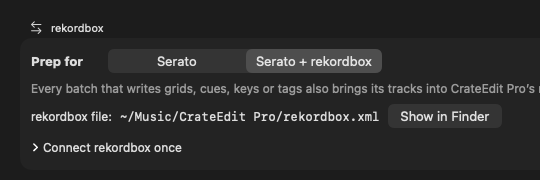
Set Prep for to Serato + rekordbox. From then on, every batch that writes grids, cues, keys or tags also brings its tracks into CrateEdit Pro’s rekordbox file, as a playlist named Latest batch. Undo updates it too, a renamed file follows, and a file moved to the Trash leaves it. Your files still get Serato’s data as always.
In rekordbox, reload rekordbox xml, open Latest batch, select its tracks and Import To Collection, as above.
Bring rekordbox playlists to Serato
- In rekordbox, choose File › Export Collection in xml format.
- Quit Serato.
- In CrateEdit Pro’s rekordbox tab, click Choose rekordbox XML… and tick the playlists you want. “All tracks in the collection” brings the tracks without making a crate.
- Choose what comes along: Beat grids, Hot cues & loops, Keys, Playlists as crates. Then click Import.
Hot cues and hot loops land on Serato’s pads. Memory cues fill the pads that are free, and memory loops become saved loops. The import is one batch: Undo puts the files back, and the crates stay. In Serato, Re-scan File Info shows new cues and keys. For a new grid on a track Serato already knows, remove the track from Serato’s library (not from your drive) and add it again.
Or straight to a USB stick
If the stick is all you need, rekordbox can stay closed. The USB tab writes the stick the way rekordbox does: its device library and each track’s analysis files, for CDJs, XDJs and all-in-ones that read a rekordbox USB.
- In CrateEdit Pro’s USB tab, choose Pioneer DJ (rekordbox USB) and tick the crates.
- Plug in the stick, formatted FAT32 (MS-DOS) or Mac OS Extended, and pick it. Click Export to and the stick’s name, then Export.
- Each crate becomes a playlist, with Serato’s grids, hot cues A to H in their colors, cue loops as hot loops, saved loops as memory loops, keys, artwork and the waveforms. Eject the stick, and it’s ready.
Export again after changes: only new or changed music is copied. A stick rekordbox exported to keeps its tracks and playlists, and its library is saved on your Mac first. The stick gets OneLibrary too, for the newest players. Engine DJ players get the same, in Engine DJ’s own library. More on the Features page.
How close it lands
An MP3 doesn’t start at exactly the same moment in every app: decoders deal with the encoder’s silent start differently. CrateEdit Pro works out each file’s offset and moves every cue and grid line to match rekordbox. In our tests on click tracks, every beat landed within 1.5 ms of rekordbox’s own timing, and a round trip from Serato to rekordbox and back gave the same cues, loops, grids and keys.