 CrateEdit Pro
Turn your downloads folder into a DJ inbox
Every week the same routine: download from the pool, work out which tracks you already have, catch the fake 320s, then grid, key and cue the rest before you can play them. Crate Prep turns that into an inbox. New tracks are looked over first, prepped in one go, and land in one crate in Serato.
Check first
Check first runs before anything is written, and changes nothing. It lists the tracks to look at:
- Already in your Serato library: the same artist and title, or the same file name, and within two seconds of the same length.
- Another version is in your library: the same artist and title once brackets like (Clean) are set aside, or a different length.
- Fake or low-bitrate copies: a file saved at 320 kbps from a lower-bitrate copy, or an honest file at a low bitrate.
- Missing tags: no title, artist or genre.
The list shows under the steps when the prep is done, so you know which files to delete or get again.
The prep itself
Tick the steps you want, and every track gets them in this order: beat grid, Camelot key, hot cues named and colored by your Cue Template, clean tags, an energy rating from 1 to 10, and Serato’s stored gain back to 0 dB. One click on Undo puts the whole prep back.
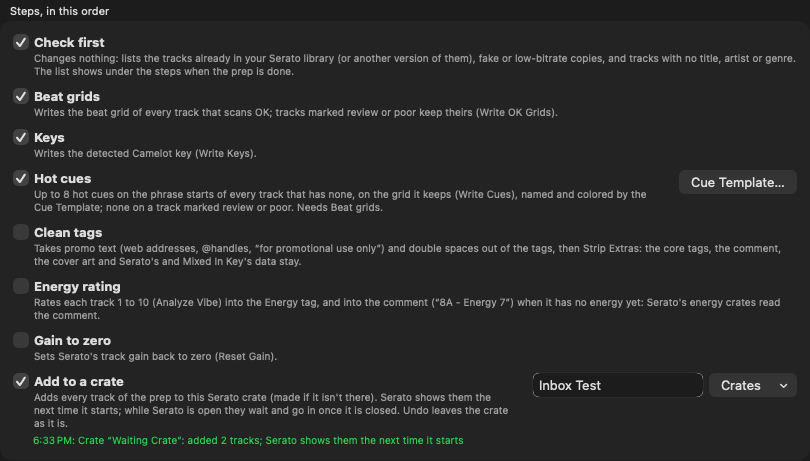
Add to a crate
The last step puts every track of the prep into one Serato crate: New Music, unless you type another name or pick one of your crates. What’s in the crate already stays, and no track goes in twice. While Serato is open the tracks wait, and go in once it’s closed. Serato shows them the next time it starts. Undo leaves the crate as it is.
Watch the folder
- Under Watch folder, click Choose… and pick the folder your pool downloads into.
- Turn on Watch this folder.
While CrateEdit Pro is open, it looks every 30 seconds and preps each new track once it has finished downloading. What was in the folder before is left alone; Prep Folder does those. With Check first on, the note under it says how many new tracks there are to look at.

A weekly routine
- Download from your pool into the watched folder.
- Let Crate Prep check and prep each track as it lands.
- Read the Check first list. Delete the copies you already have, and get the fake 320s again from a better source.
- Quit and reopen Serato. The New Music crate has the rest, gridded, keyed and cued.
Two notes. Close Serato before you prep tracks it already has, because the gain reset and the tag clean-up need it closed. And with library backups on, your Serato library is backed up before every prep that runs while Serato is closed: see how to back up your Serato library.