 CrateEdit Pro
Clean up messy tags: capitals, feat. credits and genres
Every pool and store tags files its own way. One track arrives in ALL CAPS, the next has “ft.” in the artist, and your genre column lists Hip Hop, hip-hop and HipHop as three genres. Then there are the underscores, the track numbers and the site names. Search, sorting and Smart Crates all suffer. Clean Up Tags fixes all of it in one pass, and shows you every change first.
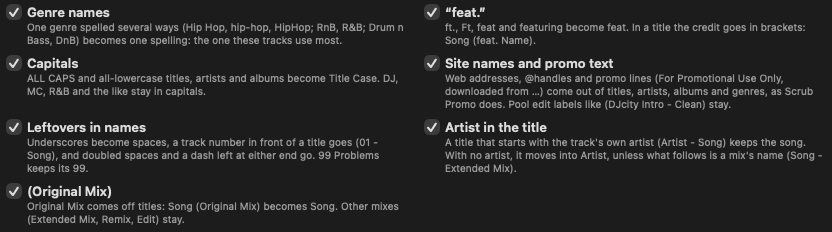
Capitals
Titles, artists and albums written entirely in capitals, or entirely in lowercase, become Title Case. Words that belong in capitals stay that way: DJ, MC, R&B, EDM, AC/DC, LL Cool J, KRS-One, Run-DMC, Roman numerals and the like. Little words stay small: ft., feat., vs., and an “x” between two names (but not Malcolm X). 1ST becomes 1st and 90S becomes 90s. Anything already in mixed case is left as you wrote it.
feat. credits
ft., Ft, feat and featuring all become feat. In a title, the credit goes into brackets, before any remix name or radio edit: Song (feat. Name) (Remix).
Genre spellings
Spellings of one genre are grouped: capitals, spaces, dashes and accents don’t count, “and”, “n” and “’n’” read as “&”, and known pairs such as RnB and R&B or Hip-Hop/Rap and Hip Hop go together. Then the well-written spelling your tracks use most wins, and every track in the group gets it.
Tidy names
Four more fixes take the leftovers out of names:
- Site names and promo text: web addresses, @handles and promo lines (For Promotional Use Only, downloaded from…) come out of titles, artists, albums and genres. Pool edit labels like (Intro - Clean) stay.
- Leftovers in names: underscores become spaces, a track number in front of a title goes (01 - Song), and so do doubled spaces and a dash left at either end. 99 Problems and 7 Rings keep their numbers.
- Artist in the title: a title that starts with the track’s own artist (Artist - Song) keeps the song. With no artist, it moves into Artist, unless what follows is only a mix’s name (Song - Extended Mix). The other way round works too: in Song (Remix) - Artist, the artist goes into Artist and the song stays the title.
- (Original Mix): comes off titles, so Song (Original Mix) becomes Song. Other mixes (Extended Mix, Remix, Edit) stay.
Run it on a crate
- Open the Tag Editor and drop in a folder or a crate’s tracks.
- Select two or more rows to clean just those; otherwise every row is cleaned. Click Clean Up Tags….
- Read the list: each change shows the field, what it is now and what it becomes. Untick any change you want to leave as it is.
- Click Apply. The changes go into the table, and ⌘Z takes them back.
- Click Save All to write them to the files. The Undo button at the top right puts the saved tags back. In Serato, Re-scan File Info shows the new tags.
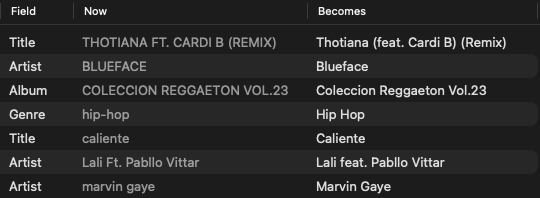
More clean-up in the same table. Strip Extras removes junk tags, Scrub Promo removes web addresses and promo lines, and Rename Files names each file from its tags. See the Tag Editor.