 CrateEdit Pro
Pick the next track: build a harmonic set by key, BPM and energy
You know the track that’s playing. The hard part is the next one: a key that blends, a tempo your pitch fader can reach, and an energy that goes where the room is going. Next Track searches your whole Serato library for that, ranks what fits, and builds a set you can save as a crate.
What makes a good next track
Three things decide whether a mix works: the keys blend, the tempos meet, and the energy moves the way you want. Next Track scores every track in your library against the one you’re mixing from, out of 100. The key counts most, then the BPM, then the energy, and only what both tracks have is counted, so a track with no energy rating is ranked on key and BPM alone.
- Key, read on the Camelot wheel. The same key scores highest, then one step up or down, the mood switch (8A to 8B), the diagonal (8A to 9B), the energy boost (two steps up) and the semitone lift (seven steps up). Anything else clashes.
- BPM, as the pitch you would need. The closer, the better, and a track outside your range is left out. Half and double time count: a 62 BPM track can follow one at 124.
- Energy, the 1 to 10 rating in the comment, as CrateEdit Pro and Mixed In Key write it.
Pick the track you’re mixing from
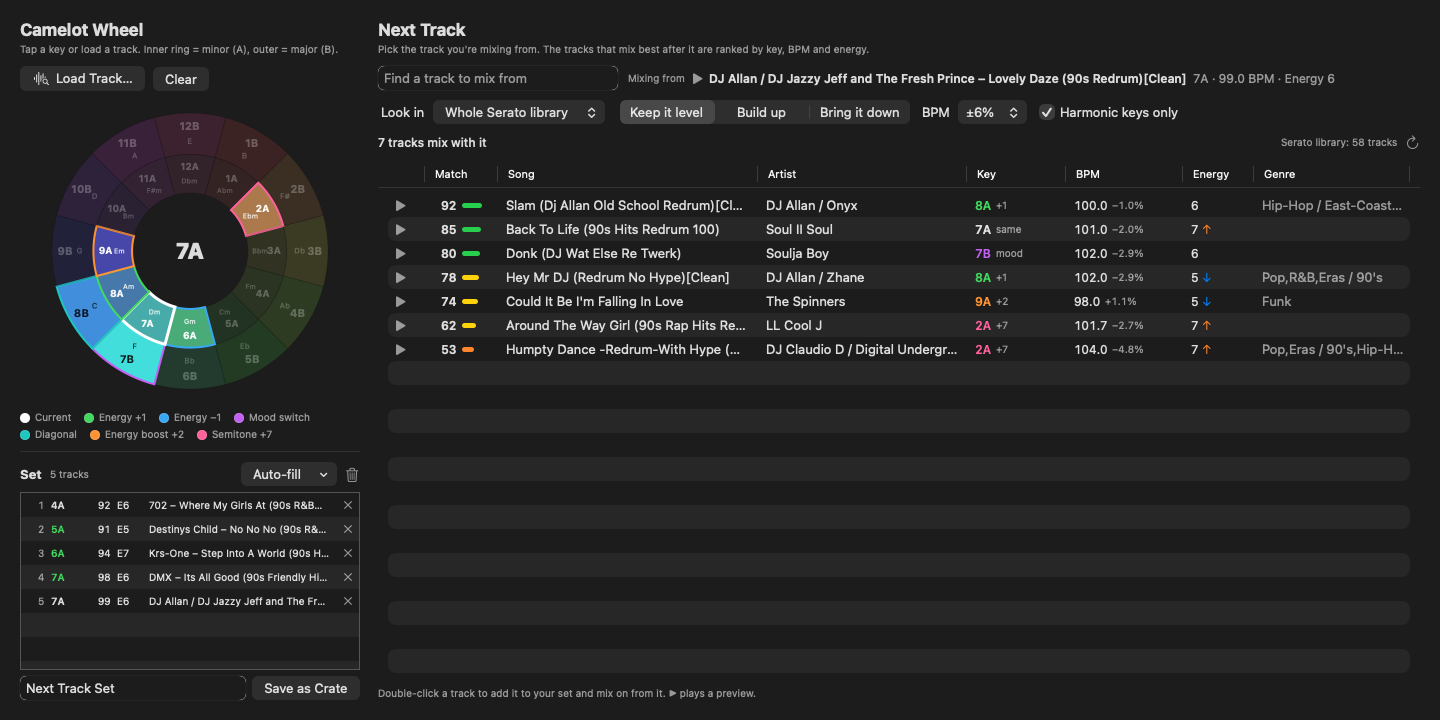
- Open the Harmonic tab. The Camelot wheel is on the left, Next Track on the right.
- Type part of an artist or title in Find a track to mix from. It searches your Serato library the way Serato does, so “cafe” finds “Café”.
- Or load a track, or drop one on the wheel. A track with no key in its tags gets one detected from its audio.
- Or just tap a key on the wheel to see every track that mixes with that key, with no tempo limit.
Set the direction
- Look in your whole Serato library or one crate.
- Keep it level, Build up or Bring it down sets where the energy should go. Build up favours one step up in energy; Bring it down, one step down.
- BPM sets how far you’re willing to pitch: ±3, 6, 8, 10 or 16%.
- Harmonic keys only (on unless you untick it) hides the clashing keys.
Read the list
Each row is one track that mixes, best first. The match score has a bar beside it. The key is colored by the move it makes from the track you’re mixing from and says which move it is: same, +1, −1, mood, diagonal, +2 or +7. The BPM shows the pitch you’d need, with ×2 or ×½ when half or double time is counted. The energy has an arrow when it goes up or down.
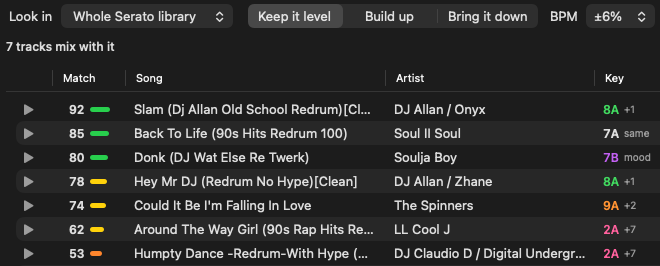
The play button on each row gives you a preview. Right-click a row to add it to the set, mix from it, play a preview or show it in the Finder.
Build the set and save it as a crate
- Double-click a track. It joins the set under the wheel and becomes the track you mix from, so the list now shows what comes after it. Tracks already in the set aren’t offered again.
- Keep going, or click Auto-fill to grow the set to 5, 10, 15, 20 or 30 tracks, each the best next of the one before. If nothing more mixes on with your settings, it says so.
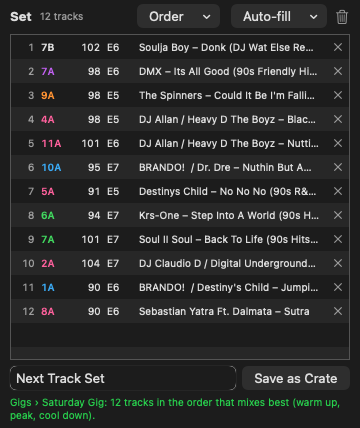
- Drag tracks into another order, or take one out. Each track in the set is colored by its move from the one before it.
- Name the set and click Save as Crate. Quit Serato first: the crate is there, in the set’s order, the next time Serato starts. A name that’s taken gets a number.
Put a whole crate in order
Already have the tracks, just not the order? Set Builder takes the set, or any crate, and puts it in the order that mixes best: keys stepping round the wheel, tempos close, and the energy following the shape you pick.
- Click Order above the set and pick the energy shape: Warm up, peak, cool down (the peak comes about two thirds in), Build up, Keep it level or Bring it down.
- Click Order This Set, or pick a crate under Order a Crate. Its tracks become the set, each song once, in the new order. Each key is colored by its move from the one before.
- Move a track by hand if you like, then Save as Crate. Your crate itself stays as it is; the ordered one is saved beside it.
Next Track works with what’s in your library. Tracks with no key yet? Write keys for a whole folder with Batch Grid. No energy ratings? Run Analyze Vibe in the Tag Editor. More on reading the wheel in harmonic mixing with the Camelot wheel.