 CrateEdit Pro
The wedding must-play list: how to check it against your Serato library
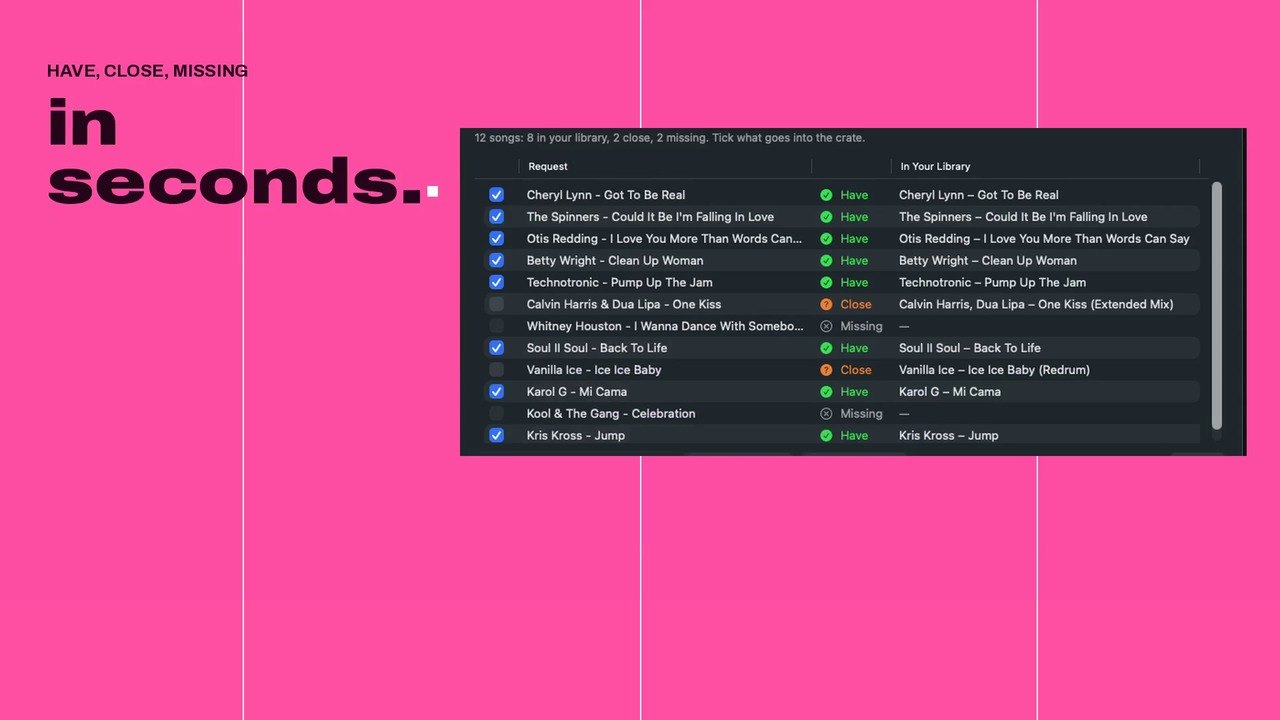
A client’s must-play list, checked. Each song comes back as in your library, close or missing.
Every wedding DJ gets the list: the songs the couple has to hear, usually a week out, usually typed on a phone. Here’s how to ask for it, check it against your Serato library, sort out the songs that are close or on both lists, and walk in with a crate in their order and a printed run sheet.
The short version
- Ask early, and ask for both lists. Must play and do not play, artist and title on every line, two to three weeks before the date.
- Check every song against your library the same day. You find out what you have, what you have in another version, and what you need to buy while there’s still time.
- “Close” is a question for the client. An extended mix, a clean edit or a cover isn’t always the version they mean.
- Catch the songs that are on both lists. It happens more than you’d think, and it’s much easier to sort out by text than on the night.
- Build one crate in their order, and print the run sheet. The night of, you play from a crate, not from a phone screenshot.
Why the must-play list goes wrong
The list itself is rarely the problem. The trouble is everything around it. It arrives the week of the wedding, typed from memory on a phone. Half the lines are song titles with no artist. “Hold On” could be Wilson Phillips, En Vogue or Alabama Shakes. “Shout” could be the Isley Brothers or Tears for Fears. One relative wants the radio edit, another remembers the extended mix from a club fifteen years ago.
Then there’s the other list. Most couples have at least a few songs they never want to hear, and those usually come in a separate message, from a different person, a few days later. A song can end up on both lists, and nobody notices until someone asks for it at 10 PM.
None of that is hard to fix. It just has to be fixed before the gig, while you can still ask.
Ask for it the right way
- Set a date. Two to three weeks before the wedding gives you time to buy what you’re missing and ask about anything unclear.
- Ask for artist and title on every line. “Artist – Title”, one song per line, is the easiest format to check.
- Ask for the do-not-play list at the same time. One message, two lists, one person who answers for both.
- Keep the moments apart. The entrance, first dance, parent dances, cake cutting and last song are their own short list. They’re played once, at a set time, and you should have them ready to go on their own.
- Ask about clean versions. If grandparents or kids are in the room, say so now, not when the explicit verse starts.
Check every song against your library
In Serato you can search the list one song at a time. For ten songs that’s fine. For forty, with half of them missing an artist, it takes a while and it’s easy to skip one. Whichever way you do it, sort every line into one of three piles:
- Have. The song, by that artist, is in your library.
- Close. You have the song, but in another version: an extended mix, a remix, a different edit.
- Missing. You don’t have it. Buy it or download it from your record pool now, not the morning of.
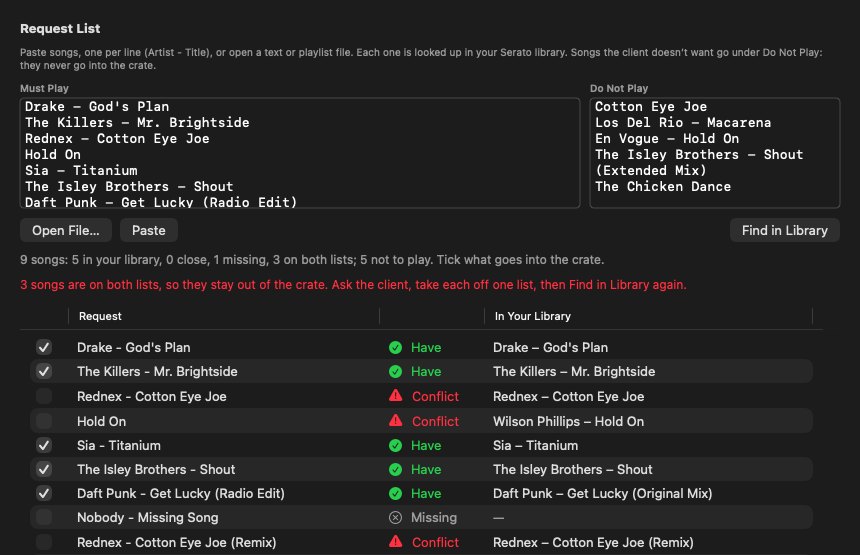
The Request List in CrateEdit Pro. The must-play list on the left, the do-not-play list on the right, and each song checked against the Serato library. Songs that are on both lists are marked Conflict and stay out of the crate.
“Close” is a question, not a yes
A close match is where most wedding requests quietly go wrong. You see the title in your library and move on, but the client asked for the radio edit and you have an eight-minute extended mix. Or the request says the original and you have a remix. Sometimes that’s fine. Sometimes it’s the first dance.
So treat every close match as a quick question for the client, with the version you have: “I have One Kiss as the extended mix, is that the one?” One message covers them all, and you only send it once.
The do-not-play list, and songs on both lists
The do-not-play list protects you as much as the couple. If a song on it gets played, that’s the part of the night people remember. Two things to check:
- Does a do-not-play line mean every version? “Cotton Eye Joe” on its own usually means any version of it. “Cotton Eye Joe (Remix)” might mean only the remix. If you’re not sure, ask.
- Is anything on both lists? When the bride’s list says must play and the groom’s says never, don’t pick a side. Send the song back and let them decide.
Keep the do-not-play songs out of the crate you play from, so they can’t come up by accident when you’re reaching for the next track.
Build the crate in their order, and print a run sheet
Once the list is settled, put the songs you have into one Serato crate, in the order the client wrote them. They often list them roughly in the order they picture the night, and that gives you a starting shape for the set. The moments get a crate of their own.
Then print the list. A one-page run sheet with each song, its status, and the file, BPM and key you’re going to play is easy to check with the couple or the planner before you start. It also gives you something to look at that isn’t your phone.
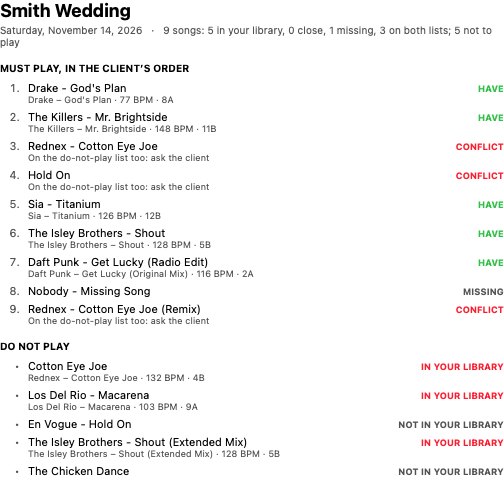
A run sheet from the Request List. The must-play songs in the client’s order with the file you have, its BPM and key, then the do-not-play songs and whether they’re in your library.
The week of the wedding
- Every missing song bought or downloaded, and checked again against the list.
- Every close match answered by the client.
- No song left on both lists.
- The must-play crate and the moments crate in Serato, with beatgrids and hot cues on every track.
- The run sheet printed, with a copy for the planner.
- Your library backed up before you leave the house.
How CrateEdit Pro does it
The Request List in CrateEdit Pro does the checking for you. Paste the must-play list, or open a text or playlist file, add the do-not-play list beside it, and press Find in Library. Every song comes back as Have, Close or Missing against your Serato library, and songs on both lists are marked Conflict and kept out. Then save the songs you have as a Serato crate in the client’s order, copy the missing ones to your clipboard, and print the run sheet. It’s compatible with your Serato library format, and Serato shows the crate the next time it starts.
See it in 35 seconds: Turn a Client’s Must-Play List into a Serato Crate in Seconds, or watch it with the other tutorials on the Learn page. If you’re booking more weddings next year, getting more gigs is a good next read.