 CrateEdit Pro
WAV files in Serato: why some tracks get analyzed again and lose their tags
WAV is the format a lot of producers and pools hand out. Its tags are where it gets tricky.
Image: Serato
You prep a folder of WAVs, set the key, lock the grid, place your cues, and add them to Serato. Most come in exactly as you left them. Then one track shows a different key and a grid that moved. We imported 40 WAVs in four batches to find out why, and it came down to where the tags sit inside the file.
What’s inside a WAV
A WAV file is a row of blocks called chunks. Each one starts with a four-letter name and its size, and a player skips any chunk it doesn’t know. Two chunks are always there: fmt, which says how the sound is stored, and data, the sound itself.
Tags are extra chunks, and there are two kinds:
- The INFO list. The old RIFF way to tag a file: title, artist, a comment, a date. Most programs that save WAVs write one, from DAWs to converters to download stores. It has no place for a beatgrid or cue points.
- The ID3 chunk. The same kind of tag an MP3 carries, put inside the WAV. This is the one that can hold everything a DJ app adds: key, BPM, the beatgrid, cues, loops, the lock.
The WAV specification never said where an INFO list should go, so it turns up in front of the sound in some files and after it in others. That turned out to matter.
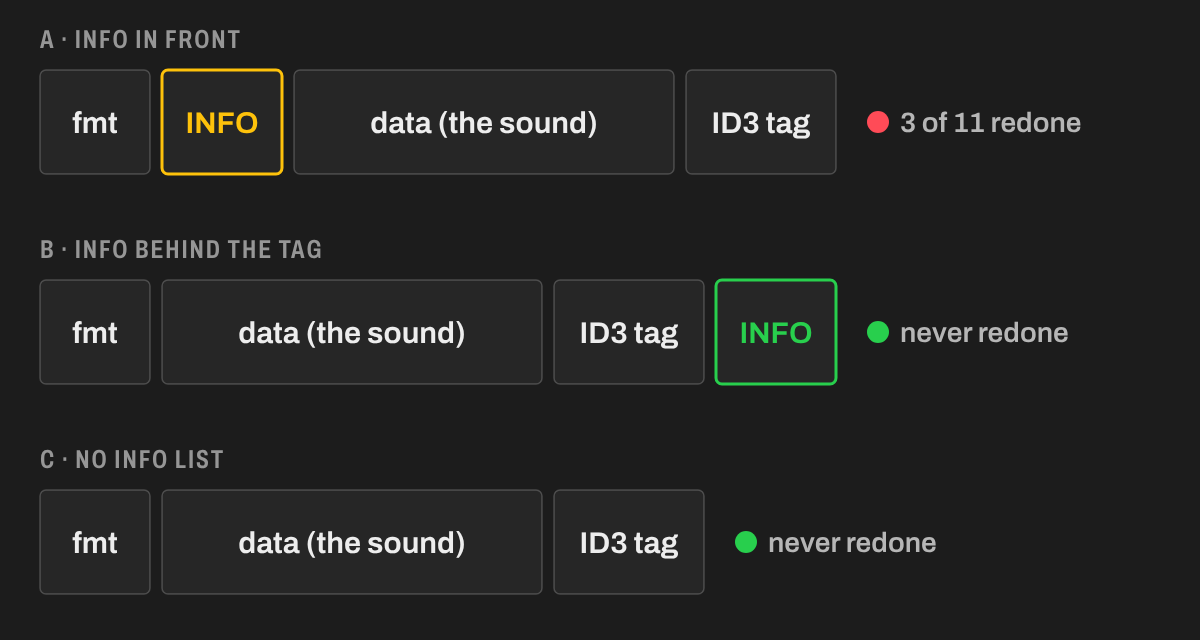
The three layouts we tested, and how many of each Serato analyzed again. None of the 29 files in groups B and C were redone.
The test
We made 40 test WAVs, gave each one a key, a locked beatgrid and five cue points, and added them to Serato DJ Pro in four batches. Serato analyzes new tracks when they come in, so after each batch we read every file again to see what it had kept.
The files came in several layouts, in three groups. A: the INFO list in front of the sound and the ID3 tag at the end, the way most programs leave a WAV after a tag is added. B: the INFO list somewhere behind the ID3 tag. C: no INFO list at all.
What Serato did
In each of the first three batches, exactly one WAV was analyzed again. When that happened, Serato:
- replaced our key with its own reading (7A became Fm, 4A, on a test click track)
- moved the start of the beatgrid by about 10 milliseconds
- set its own auto gain
- kept the cue points and the lock, though the lock showed only after the track was loaded
Every redone WAV was a layout A file. Not every layout A file was redone: 3 of the 11 were, one per batch. None of the 29 WAVs with the INFO list behind the tag, or with no INFO list, were ever touched.
| Batch | WAVs | Redone | What Serato did |
|---|---|---|---|
| 1 | 1 | 1 (A) | key, grid, gain redone |
| 2 | 7 | 1 (A) | key, grid, gain redone |
| 3 | 20 | 1 (A) | key, grid, gain redone |
| 4 | 12 | none | all kept |
| After the change | 8 | none | all kept |
Four imports and a fifth after the fix. Batch 4 had no layout A files. The last row is 8 layout A files prepped by CrateEdit Pro after the change.
We can’t see why Serato picks one file a batch, and Serato doesn’t document how it reads WAV tags. What we can say is which layout it never redid. When Serato writes a WAV’s tags itself, it puts its own tag first and the INFO list after it, and that’s the layout that came through every time.
Why one track matters
One redone track in a batch sounds small. But it’s a track you think is ready: you prepped it, you saw the right key, and the grid you locked is no longer the grid you play. A key that’s off by a few steps on the wheel sends Next Track and harmonic mixing the wrong way, and a grid that moved puts your loops and quantized cues a hair off the beat.
The other formats we tried the same day (MP3, AIFF, FLAC, ALAC and AAC) kept everything, in every import.
Check your own WAVs
- Add a few first. Before you add a big WAV folder, add three or four, load each one and check the key, the grid and the lock.
- Watch the key column. A key written in a different style from the rest of the crate (Fm next to a column of Camelot keys, say) is a sign Serato read the track itself.
- Prefer AIFF for new downloads. If a store or pool offers both, take AIFF: it carries the same sound, and it kept everything in every import we did.
- Keep the original. If you change how a WAV is laid out, do it on a copy, or with a tool that can undo it.
If you prep with CrateEdit Pro
When CrateEdit Pro writes a WAV’s tags, any INFO list in front of the sound moves behind the tag, and an empty block of the same size takes its place, so the sound itself doesn’t move. It’s the order Serato uses. After that change we prepped 8 fresh WAVs with the INFO list in front and added them to Serato: all 8 kept our key, grid, cues and lock. Our guide to prepping a Serato crate has the steps.
Sources
- Our test: 40 WAVs in four imports into Serato DJ Pro on a Mac, then 8 more after the change, November 1, 2026.
- WAV, Wikipedia: chunks, the INFO list and where it goes, and ID3 tags in extra chunks.
- TagLib::RIFF::WAV, TagLib documentation: the ID3 chunk in a WAV.
- Serato DJ Pro supported file types, Serato support.