 CrateEdit Pro
Fake 320s: how to spot an MP3 that isn’t what it says

Where a fake shows: a club system with real tweeters, at peak time.
Photo: Arnold Jaeger Werner, CC BY 2.0, via Wikimedia Commons (cropped)

Your file says 320 kbps. The sound inside may be a 128 that someone saved again at 320. We made fakes on purpose from twelve CD-quality tracks, measured where the sound stops in every version, and checked what a quick look can and can’t catch.
What a fake 320 is
An MP3 encoder saves space by throwing sound away, and it starts at the top. The lower the bitrate, the lower the point where the highs are cut. A 128 kbps file keeps nothing above about 17 kHz.
Saving that file again at 320 kbps doesn’t bring the highs back. The encoder can only keep what it’s given, so you get a bigger file with the sound of a 128. The number on the label is real. The sound isn’t.
Fakes turn up everywhere: rips of streams and videos, old downloads that were passed around for years, a friend’s USB stick, and now and then a file that was converted again somewhere along the way before it reached you.
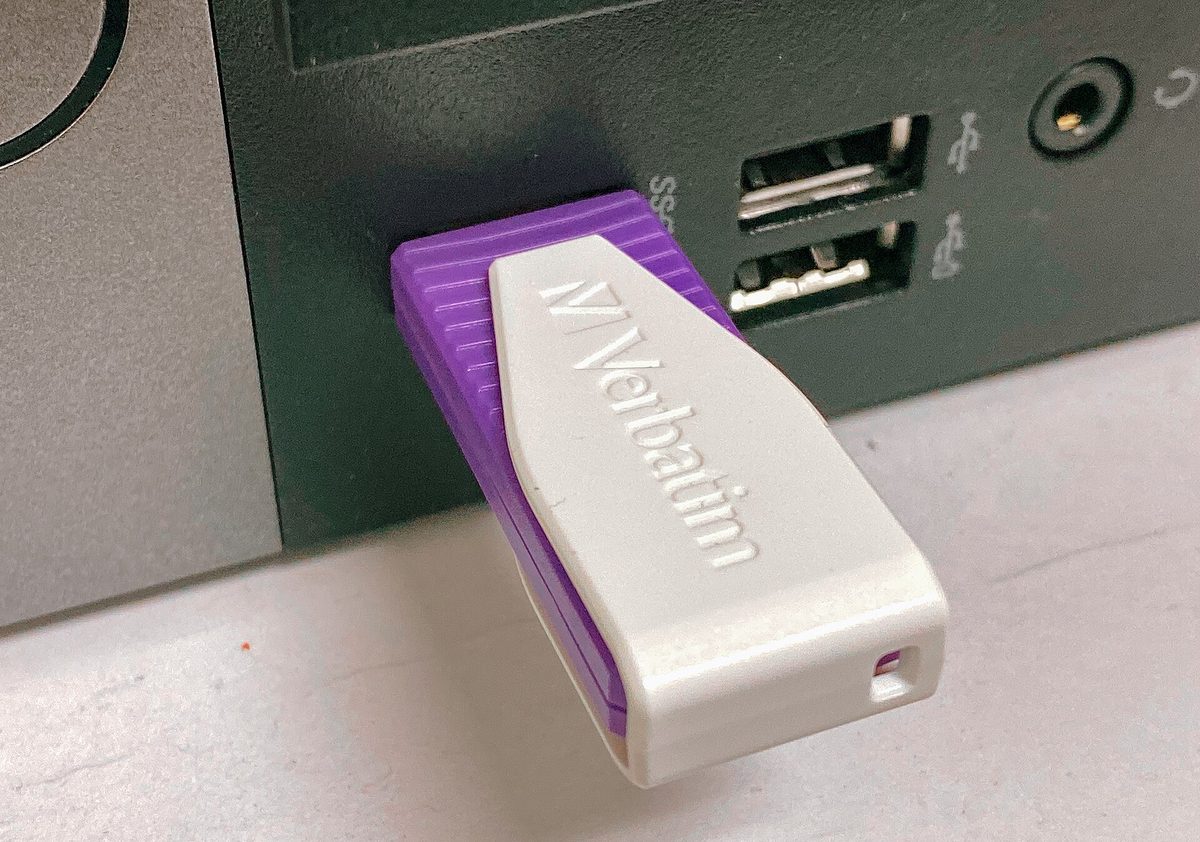
Passed hand to hand. A file can be converted somewhere along the way, and the label still says 320.
Photo: Tony Webster, CC BY 2.0, via Wikimedia Commons

See it for yourself: the ceiling
Open the file in a spectrogram viewer. Time runs from left to right, pitch from bottom to top, and brighter means louder. Look at the top of the picture during the busiest part of the track, where the hats and cymbals are.
Real 320
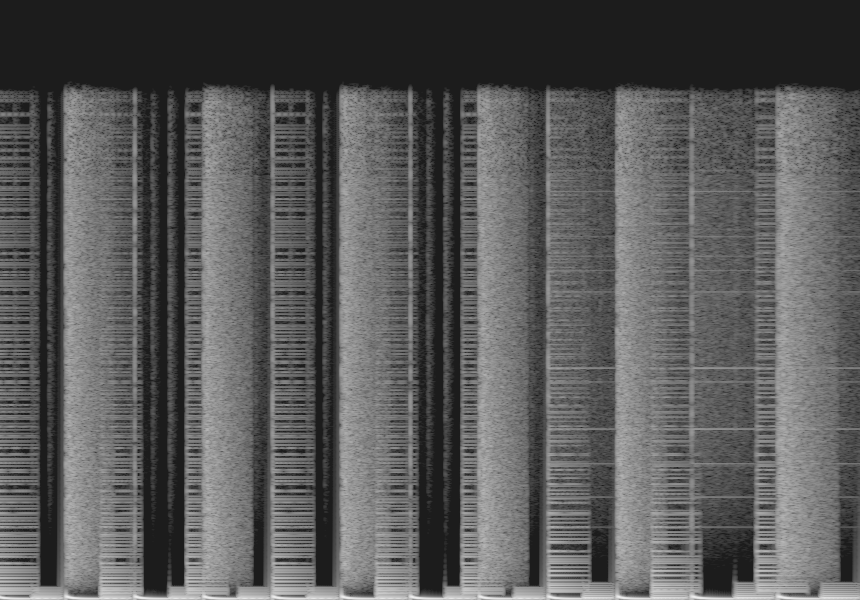 sound stops at 20.3 kHz
A 128, saved again at 320
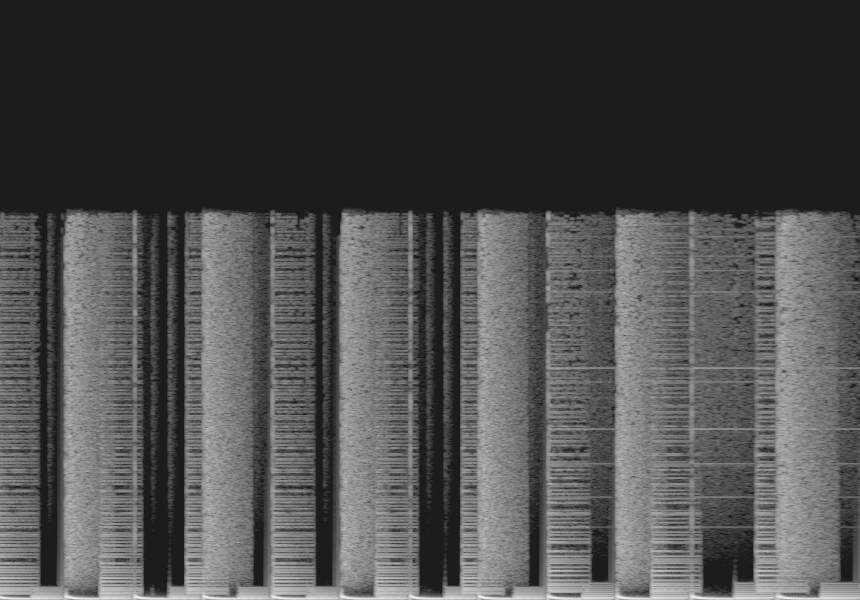 sound stops at 16.8 kHz
The same test beat, saved two ways. Left: saved straight to 320 kbps; its sound goes up to 20.3 kHz. Right: saved at 128 kbps, then again at 320; its sound stops at 16.8 kHz, in a flat line. Both files say 320 kbps and are the same size. Time runs left to right over six seconds, pitch bottom to top, brighter is louder. The beat was made from scratch for this page.
A real 320 has sound up to about 20 to 21 kHz. A fake stops lower, and it stops in a flat, straight line, as if the top had been cut off with a knife. That straight edge is the encoder’s work. Music doesn’t end like that on its own.
Two free viewers do the job: Spek, for Mac, Windows and Linux, and the spectrogram view in Audacity.
Where the sound stops: what we measured
We took twelve tracks ripped from CD and saved each one sixteen ways. Eight are honest MP3s made with LAME, the open-source MP3 encoder: six bitrates from 128 to 320 kbps and two VBR settings. The other eight were first saved at a lower quality, as an MP3, as AAC (the format of iTunes downloads) or as Opus (the codec YouTube streams to most browsers), and then saved again at 320. Then we measured the highest sound in every file.
Where the sound stops in each version. The bar ends at the middle value of the twelve tracks; the thin line runs from the lowest track to the highest. The word at the right is the verdict of CrateEdit Pro’s quality check: OK, Suspect, Fake, or low for an honest low bitrate.
- Every honest bitrate has a ceiling of its own: 320 stops near 21 kHz, 256 and 224 near 20.3, 192 near 19.6, 160 near 18.3 and 128 near 17.5. The best VBR setting, V0, kept sound to the top on eleven of the twelve tracks.
- A 128 saved again at 320 stops exactly where the 128 did, on all twelve tracks. AAC files at 96 and 128 kbps made with FFmpeg’s encoder and saved again at 320 were caught on every track too. These are the fakes worth finding, and every one of them was easy to see.
- A 192 saved again at 320 stops near 19.6 kHz. It’s a fake too, only closer to the real thing, so we call it suspect.
- Apple’s own AAC encoder kept more of the top than FFmpeg’s. Its 128 kbps files saved again at 320 stopped between 18.8 and 19.5 kHz: suspect on ten tracks, clearly fake on two.
What a quick look can’t catch
Three kinds of re-saved file kept so much of the top that they look like real 320s:
- an MP3 at 256 kbps, saved again at 320;
- Apple’s AAC at 256 kbps, the quality of an iTunes download, saved again at 320;
- Opus at 160 kbps, saved again at 320.
The last one matters. Opus keeps sound up to 20 kHz, and it’s the codec YouTube streams to most browsers, so a rip of that stream can pass a ceiling check. All three lost little at the top. Whether you can hear what they lost elsewhere is another question, and a spectrogram can’t answer it.
In a real library
We ran the same check on a 594-track sample of a working DJ’s library. Of the 460 files that said 320 kbps, 69 had the ceiling of a 128 and 9 more the ceiling of a 192. That’s 78 files, about one in six of the 320s.
- 382 real 320s
- 69 fakes, sound of a 128
- 9 suspect, sound of a 192
460 files that said 320 kbps, from a 594-track sample of a working DJ’s library, checked the same way.
Another 81 files in the sample were honest 128s and 160s. They say what they are, and that’s a different problem: you know to replace them.
Can you hear it?
On laptop speakers, often not. On a club system with real tweeters, a 128 next to a real 320 tends to sound duller at the top: the hats and cymbals lose their air, and turning the highs up can’t bring back sound that isn’t in the file. It shows most where you can least afford it, at peak time on a big system.
A soft top isn’t a fake
Some music has little up there to begin with: older records cut from tape, lo-fi beats, and some tracks made with AI (the AI-made beats we measured faded out above about 18 kHz). Their highs fade out gradually. An encoder cuts them in a straight line. A soft slope tells you nothing about the file. A hard, flat ceiling does.
What to do with a fake
- Don’t convert it again. No setting brings the highs back, and every new save loses a little more.
- Get it again from a better source: a store that sells WAV, AIFF or real 320s, or your record pool.
- If you have to keep it, know what it is, and don’t make it the track you drop at peak time.
Check a whole crate at once
CrateEdit Pro runs this check on a whole crate. In Batch Grid, tick Quality and every file gets a verdict, Fake, Suspect or low, with the reason in its tooltip. It reads the files and changes nothing in them.
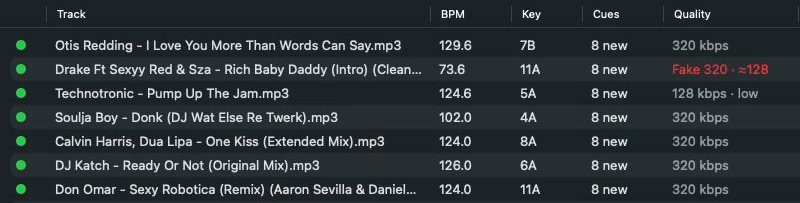
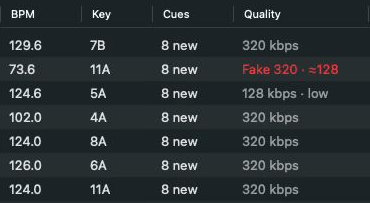
In the app. Batch Grid with Quality ticked: one file flagged as a fake 320 whose sound stops like a 128’s, and an honest 128 marked low.
Sources
- Our measurements: 12 tracks ripped from CD, 16 versions each, measured with CrateEdit Pro’s quality check (October 2026). The test beat in the first picture was made from scratch for this page.
- Opus (audio format), Wikipedia: its 20 kHz bandwidth, and its use by YouTube.
- Spek, a free spectrum analyser.
- Spectrogram View, the Audacity manual.