 CrateEdit Pro
The DJM-A7 is out, and Serato DJ Pro 5.1 supports it
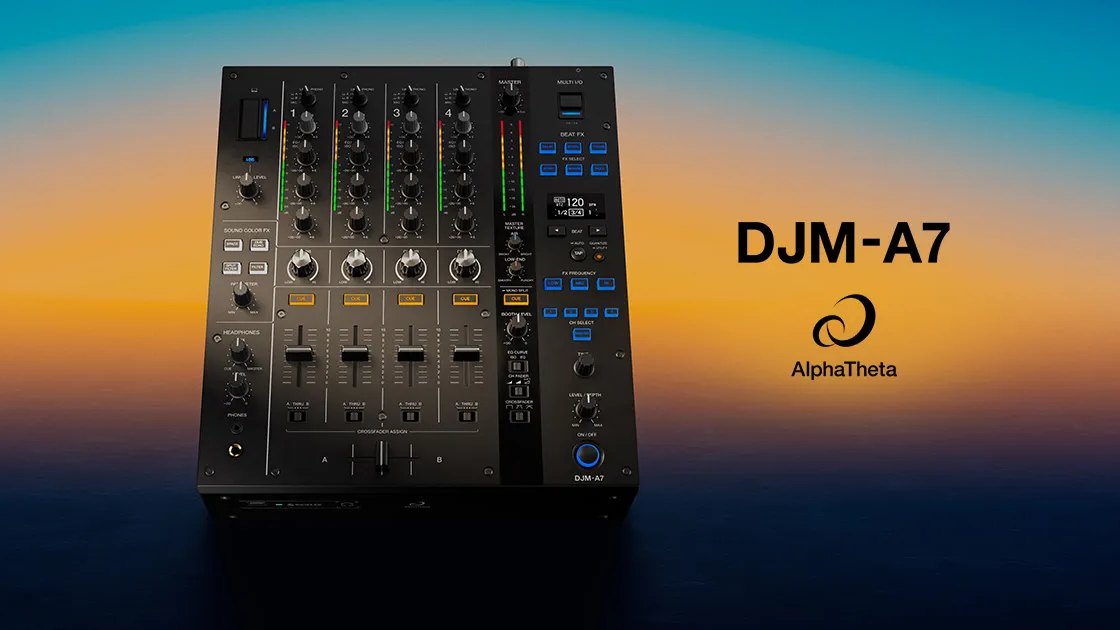
The AlphaTheta DJM-A7. A four-channel mixer with the DJM-A9’s layout, announced November 10, 2026.
Image: AlphaTheta
AlphaTheta’s DJM-A7 came out on November 10, 2026, and Serato DJ Pro 5.1 arrived the same day to support it. It’s a $1,599 four-channel mixer with the DJM-A9’s layout and two new knobs for the room. Here’s what’s on it, what it leaves out, and what you need in Serato before you plug in.
What’s new, in one minute
- The DJM-A7. A four-channel mixer with the DJM-A9’s layout, the same 45 mm channel faders and the same ESS 32-bit converters, in a body about the size of a DJM-750MK2. It’s $1,599 and reaches dealers in November.
- Master Texture. Two knobs on the master: Air (Smoky to Bright) and Low-End (Smooth to Punchy), to fit the sound to the room.
- Fewer, quicker effects. Six Beat FX on their own lit buttons, and four Sound Color FX, one of them the new Split Filter.
- Two USB-C laptop ports and SonicLink. The next DJ plugs in while you play, and AlphaTheta’s wireless headphones work with it.
- Serato DJ Pro 5.1. Out the same day, it adds the DJM-A7. The mixer doesn’t unlock Serato: you need a paid Serato DJ Pro license, and Serato DJ Suite for DVS.
A DJM-A9 for smaller booths
AlphaTheta announced the DJM-A7 on November 10, 2026, as a mixer for small clubs, bars and house parties. If you’ve played on a DJM-A9 or a DJM-900NXS2, you already know where everything is: the input selectors, trim and three-band EQ run down each channel, the Color knobs sit under them, and the Beat FX are on the right. AlphaTheta’s own words are that it inherits the A9’s layout and usability.
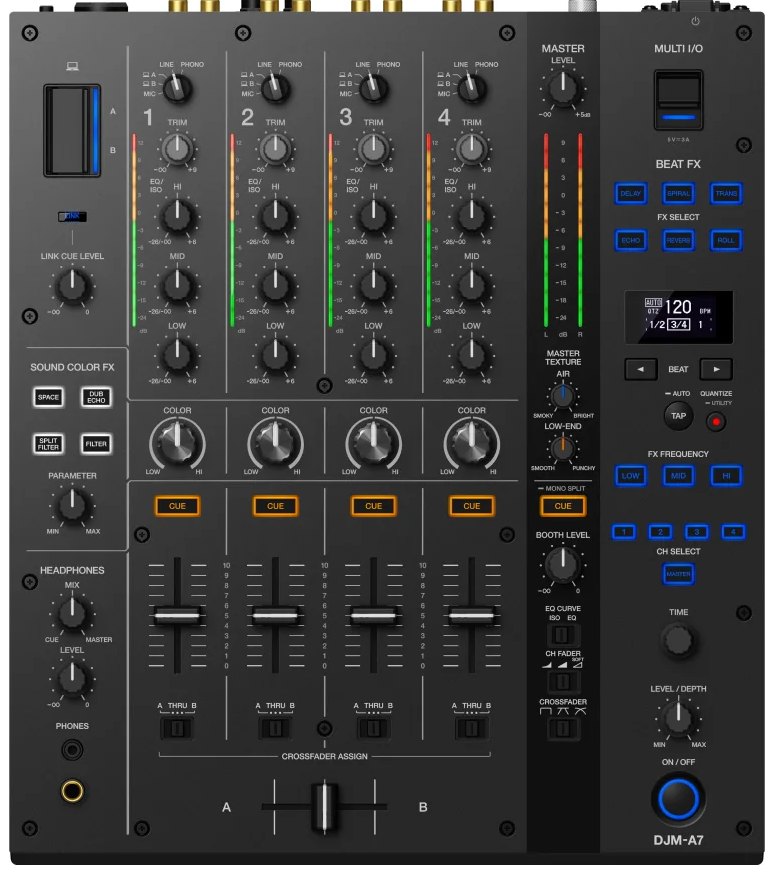
The DJM-A7 from above. Sound Color FX on the left, the four channels, then the master section with Master Texture’s Air and Low-End knobs, and the six Beat FX buttons on the right.
Image: AlphaTheta
It costs $1,300 less than the A9’s $2,899, and $200 more than the DJM-750MK2. The size is close to the 750MK2: the same height and depth, and 11 mm wider at 331 mm.
Master Texture: two knobs for the room
The new idea on the A7 is Master Texture, two knobs on the master output. Air moves the top end between Smoky and Bright, and Low-End moves the bottom between Smooth and Punchy. AlphaTheta says no mixer has done this before. The point is a small room you don’t control: a bright bar where the highs bite, or a basement where the bass booms. You tune the whole mix once instead of riding every channel’s EQ all night.
It isn’t a cure for a clipping mixer. If the master meter sits in the red, turn the channels down first. Our gain staging guide shows where the levels should sit.
The effects: Split Filter and six Beat FX buttons
Sound Color FX has four effects: Space, Dub Echo, Filter and the new Split Filter. Split Filter works mainly on the mids and leaves the lows and highs alone, so you can carve the vocal out of a track while its kick and hats keep going.
Beat FX drops the A9’s selector knob for six lit buttons, one per effect: Delay, Echo, Spiral, Reverb, Trans and Roll. That’s fewer effects than the A9’s 14, but each one is a single press away. The channel select, FX Frequency (Low, Mid, Hi), Time and Level/Depth controls work the way they do on the bigger mixers.
| DJM-A7 | DJM-A9 | |
|---|---|---|
| Price | $1,599 | $2,899 |
| Channels | 4 | 4 |
| Beat FX | 6, on buttons | 14, on a knob |
| Sound Color FX | 4, with Split Filter | 6 |
| Master Texture | Yes | No |
| SonicLink | Yes | No |
| Send and return jacks | No, effects go over USB-C | Yes |
| Headphone cue | One cue system for both jacks | Two, one per DJ |
| Mic | One combo jack, picked on a channel’s input selector | A mic section of its own |
The DJM-A7 next to the DJM-A9. The A7 drops effects, the send and return, the second cue and the mic section, and adds Master Texture, Split Filter, the Soft Mix fader curve and SonicLink. From AlphaTheta and DJ TechTools.
The channel faders get a new Soft Mix curve, first seen on the DJM-V5, which rolls the highs off gently as a fader comes down.
Two laptops, SonicLink and Link Cue
The A7 has two USB-C ports for laptops, so the next DJ can plug in and get ready while you’re still playing. They also take a phone or tablet, which is how djay for iOS connects. A Multi I/O port on top connects an outside effects unit such as the RMX-IGNITE over one USB cable.
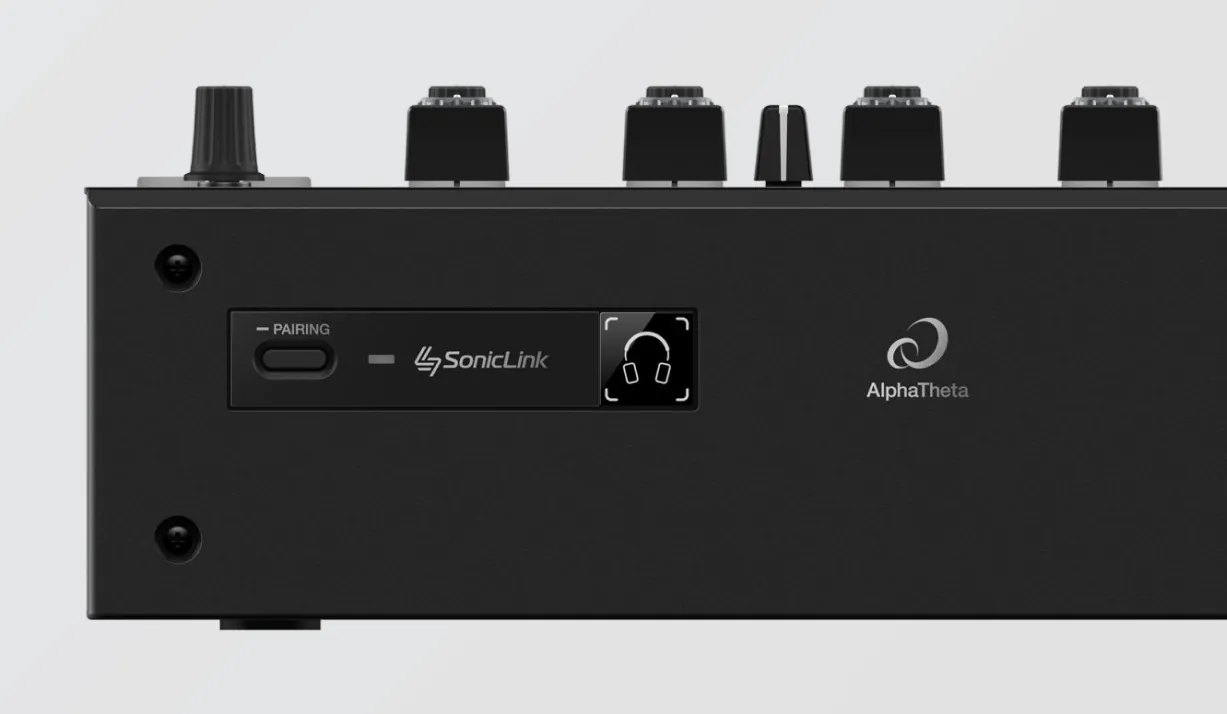
The front of the DJM-A7. The SonicLink transmitter is built in, with its pairing button and headphone touch spot on the front panel.
Image: AlphaTheta
SonicLink sends the cue to AlphaTheta’s wireless headphones with no cable. Pairing the HDJ-F9 by holding it to the mixer comes in a firmware update. Link Cue lets you hear a track on a CDJ-3000X or CDJ-1500X before you load it, from the player’s touch screen; the Link Cue Level knob sets how loud it is in your headphones.
What Serato DJ Pro 5.1 adds
Serato DJ Pro 5.1 came out the same day, and the A7 is its headline. The release also adds support for macOS 27, though Serato says its hardware partners are still testing their gear on it, so check your own setup before you update the system. Five RANE and Denon DJ drivers for Windows 11 now come with the app, and there’s a list of fixes, among them decks jumping to REL mode after a DVS mixer is unplugged, and the DJM-V5 hiding deck 3 when DVS is off.
What matters before you buy: the A7 works with Serato DJ Pro, but it doesn’t unlock it. Serato’s notes say the essential mixing features need a paid upgrade to Serato DJ Pro, and DVS (control vinyl or control CDs) needs a paid upgrade to Serato DJ Suite.
| Software | With the DJM-A7 |
|---|---|
| rekordbox | Unlocked by the mixer, no subscription |
| Serato DJ Pro 5.1 | Works, with a paid Serato DJ Pro license |
| Serato DVS | Works, with a paid Serato DJ Suite upgrade |
| djay Pro and djay for iOS | Works, paid separately |
What the DJM-A7 unlocks. Only rekordbox comes with it. From Serato’s 5.1 release notes, AlphaTheta and DJ TechTools.
Before you plug in
- Back up your library. Your crates live in the _Serato_ folder in your Music folder, and on every drive you’ve added music from.
- Update to Serato DJ Pro 5.1. Earlier versions don’t know the A7.
- If you’re on a free or Lite setup, check that you have a Serato DJ Pro license, and Serato DJ Suite if you play with control vinyl.
- Hold off on macOS 27 until your mixer and controllers are listed as working with it.
- Set your levels on the meters first, then tune the room with Air and Low-End.
If you prep with CrateEdit Pro
A new mixer doesn’t change your library. Your beatgrids, hot cues, keys and gain live in your tracks and your Serato library, so whatever CrateEdit Pro wrote before plays the same on the A7. And because CrateEdit Pro levels a crate’s loudness ahead of time, your trims stay close to the same spot from track to track, which leaves Master Texture for the room instead of fixing quiet files.
If you want the rest of this year’s AlphaTheta gear in one place, read AlphaTheta’s 2026 gear.
Sources
- Introducing the DJM-A7, AlphaTheta, November 10, 2026.
- Serato DJ Pro 5.1 release notes, Serato: DJM-A7 support, the paid upgrades, macOS 27 and the fixes.
- AlphaTheta DJM-A7: A9 layout, four channels, $1,599, DJ TechTools, November 10, 2026: price, size and the A9 comparison.
- AlphaTheta’s new DJM-A7 brings the DJM-A9 layout to smaller booths, The Fader, November 10, 2026: Master Texture, Multi I/O and Link Cue.
- AlphaTheta unveils new four-channel mixer, DJM-A7, Mixmag, November 10, 2026.